Our August 2026 user experience updates continue for Store Locator Plus® with a new Cards viewing mode for Locations. The Cards view provides a vertical scrolling column of location cards. This provides a quick view of the location data alongside a map preview to help ensure the location is where you expect it to be.
This feature replaces the SaaS-only Card listing that was in need of a refresh. We opted to include this in the WordPress plugin as well, but be aware this view can use up Google API charges when viewing this mode for users of the WordPress plugin. For the SaaS users, there are no additional charges.
Location Cards Features
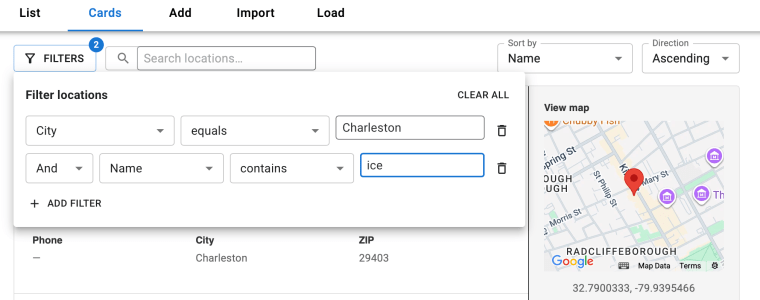
Filter Locations The location cards view provides a filter interface that allows for stacked filter selections to limit the cards that are displayed.
Search Locations The search feature is a multi-field text search that matches full or partial text across multiple location fields.
Both feature mimic the functionality of the new Location List table view that went into production last month.
Location Cards Fitler
Getting the Location Cards
Store Locator Plus® SaaS users will automatically see the new Cards view under the Locations page later this month.
WordPress plugin users will need to update to the latest Store Locator Plus® plugin. Look for the plugin version at or above v2608.04.XX for this new feature. If you’ve not updated the plugin recently you may need to update any associated add on plugins including Power, Experience, and Premier plugins. Keep in mind that all plugins require your WordPress server to be running PHP 8.2 or higher.
We’ve been working on refreshing the existing Locator Styles as part of our 2026 user interface design refresh. Locator Styles provide preset user interface designs for the public-facing side of Store Locator Plus®. The styles provide an easy way to generate a new look for what your customers see on your website when looking for places you sell your wares or provide services.
Our Locator Styles worked well when they were crafted five or six years ago, but they need a refresh to meet today’s interface design standards. We’ve started working through our catalog of pre-defined styles with refreshes that work better with modern themes on WordPress, Wix, Weebly, Shopify and other web presence solutions. The first round of refreshes it meant to upgrade the most popular styles while provide as much backwards compatibility with older web themes.
The good news it that the updated styles are not implemented automatically even if your Store Locator Plus® installation is using one of the Locator Styles we have updated. To try out the revised version of a style you need to select a new style and activate it via the Style Manager in Store Locator Plus® or reload the style if it is already active on your site. With activating a new style or reloading the current style no changes will be made to your installation.
Our revisions for early August 2026 include the Default, Bobbitt, and Bennet locator styles. These updates are now online for most users.
Default Locator Style
The Default locator style is the style that is the default layout everyone starts with. This is designed to change multiple settings back to their initial configuration and provide generic styling that inherits or works alongside multiple web presence themes.
This is the basic layout for Store Locator Plus®. It allows default browser and website themes to dictate the element styling. It has settings that take advantage of Enterprise and Professional level features.
plus… Location categories Search form style, Search by name, Category selection Results header, Prevent result listing wrap, Paginate results, Show country hours and phone, Category icons on results Map styling, hide home marker, map width, map height
plus… Search box placeholder text Map cluster markers, Google map style, map loading indicator
Bennett Locator Style
Bennett locator style, August 2026 revisions as seen in SaaS Preview mode
The Bennett locator style was created years ago for a client with a specific user interface design requested to blend with their website.
Search: Designed to search by category, city, state, tags or the dealer name versus the standard address or zip centric search. Presents the category options as clickable buttons. City and State selectors are via a drop down selection. Tag search and dealer name is a text input. Displays a reset search button to back to the original search with no filters.
Results: Presented as a 4-column design with name, country, phone, and website as the primary output. Gray highlight on hover over location. Light yellow highlight for featured locations.
This theme has been designed to work best with Enterprise subscriptions as it uses cluster markers, table layouts, and scroll map into view features. Category buttons, column result layouts, and other elements require Professional or Enterprise subscriptions.
Bobbitt Locator Style
The Bobbitt style was another customer request.
A yellow color scheme with a simplified search interface. Does NOT show an address search. Focus is on searching by name (if enabled), tags, categories, city, and state.
Results layout shows only the name, address and directions.
Location details are in the map info bubble.
This theme has been designed to work best with Enterprise subscriptions as it uses category search, tag search, city search, and state search features.
More updates are planned for our two-dozen-plus locator styles throughout the remainder of the year. We are also working on creating more advanced interactive styles that go beyond simple layout and styling. Check the Style menu and click the “New…Old” button on the top right of the style stack to see what updates we’ve released most recently.
Note: WordPress users will want to backup their installation to ensure they can recover any settings that may be changed when trying out new styles. SaaS users can review the Settings History to review what was changed and copy settings back as needed. We are working on a “restore previous setting” feature in Settings History to make this easier in the future. Contact us if you need assistance restoring your SaaS styling.
Our June 2026 update to the Store Locator Plus® SaaS platform includes our first foray into reporting and graphs. It is a very small step in that direction, but an important step that implements the next iteration of our move toward modern React-based user interfaces throughout our product line up. Our intention is to continue to capture more data about YOUR customer interactions with the Store Locator Plus® maps and expose that data to you in order to provide additional insight for your business.
Now that we have a functional framework for updating the dashboard interfaces we can turn our attention to improving our service in other vectors, starting with customer insight reporting. In the past customer interaction reporting was available to our Professional and Enterprise plans only. Moving forward we will continue to add access to interaction metrics for all SaaS customers.
The new report shows a monthly trend of map views.
Columns marked with red highlight months where your map views exceed your plan limit. The dashed line shows your plan limit. Beneath the graph is a data table showing the total views, overage (if any) and additional charges for the SaaS service if you are over your limit.
With the initial implementation we are estimating map views based on historical data. Some accounts will not have data before January 2026. Starting in June 2026 the map views are being tracked more closely and will represent actual views. Past data would sometimes under-report views due to inconsistent card processing at Stripe which triggers the map view count on the day your subscription renews.
We will continue to refine the data collection and reporting process and will have updated versions of this report as well as new features coming out soon. Please share your thoughts and feedback as well as new feature requests via the Contact Us form on your Store Locator Plus® dashboard.
If you are still managing your own Store Locator Plus® location maps and directories with our WordPress plugin collection, ask us how you can migrate to the SaaS version and take advantage of the new metric reports and map interfaces we have planned.